You're checking a boolean field in an If node or a Switch node — something like shouldEscalate, coming out of an earlier node as true. The condition looks right: field, operator "is true," nothing exotic. And then one of two very different things happens, and which one you get depends on a toggle you've probably never opened.
Either the node throws a hard error and the whole run stops dead — red X on the node, a toast that says something's wrong, no ambiguity at all. Or the node says nothing, finishes green, and just quietly does its own thing with the value, coercing it into whatever type the condition needed before comparing. Both of these are real, verified n8n behaviour on the same field, the same condition, the same kind of mismatched value — the only thing that changes between them is one setting called type validation, and it's worth understanding both sides of it, because the failure mode you actually hit depends entirely on which one your workflow is running under.
This maps onto a real thread on the n8n forum, and it's worth reading closely, because the honest version of this bug is more interesting than "it silently fails" — it's that the same underlying mismatch produces two opposite outcomes, and neither one is obviously the "normal" one until you've seen both.
New to branching in n8n? The IF node tutorial builds a true/false workflow from nothing and covers a different type gotcha — what happens when you switch a condition's type after you've already filled in values. This post picks up somewhere else entirely: the condition is set up right, and the field just isn't the type you assumed it was.
What's actually happening
n8n has two totally different kinds of "true." There's the JavaScript boolean true — the actual data type, no quotes, the kind a Boolean field or a clean API response gives you. And there's the string "true" — four or five characters that happen to spell the word (sometimes with a stray trailing space riding along from how the value got built), which is what you get whenever something upstream turns a boolean into text without you asking it to. Visually, in the output panel, the two can be almost impossible to tell apart at a glance.
What n8n does when a condition meets a value of the wrong type is controlled by a setting on the condition editor, labeled either "Convert types where required" or "Less Strict Type Validation" depending on your n8n version — same underlying setting, different wording across releases. It has two positions, and they behave in opposite directions:
- Strict (or the toggle left off) — the node refuses to compare a string against a boolean check at all. It throws.
- Loose (or the toggle switched on) — this is n8n's default behaviour for a fresh condition — the node attempts to coerce the value into the type the operator expects, then compares the coerced result.
The scenario: an escalation check fed by an upstream node's output
Picture a workflow where an earlier node — a Code node, an AI node, an HTTP call, whatever's building the judgment — outputs { "shouldEscalate": true }. Downstream, an If node reads shouldEscalate with a condition set to Boolean → is true, meant to route the item to an "alert someone right now" branch. Somewhere between that upstream node and the If node, the value picks up quote marks it shouldn't have — commonly because it passed through an expression that rendered it as text, sometimes with a trailing space attached from how the expression was built. The condition itself was never wrong. The value arriving at it is the wrong type.
This is close to the real forum thread this post is based on: an If/Switch condition comparing an upstream field expected to be true, using the operator Boolean → is true, where the value actually arriving was the string "true " — quoted, with a trailing space.
What actually happens under strict type validation
This is the mode that throws, and it's worth seeing exactly what it looks like, because the error text is specific enough to search for directly. With type validation set to strict and the value arriving as the string "true ", the node does not compare anything — it stops the workflow with a hard error:
Wrong type: 'true ' is a string but was expecting a boolean [condition 0, item 0]
On the canvas this shows as a red X on the node and a "Problem in node 'If'" toast — there's no missing it, and no continuing past it without fixing something first.
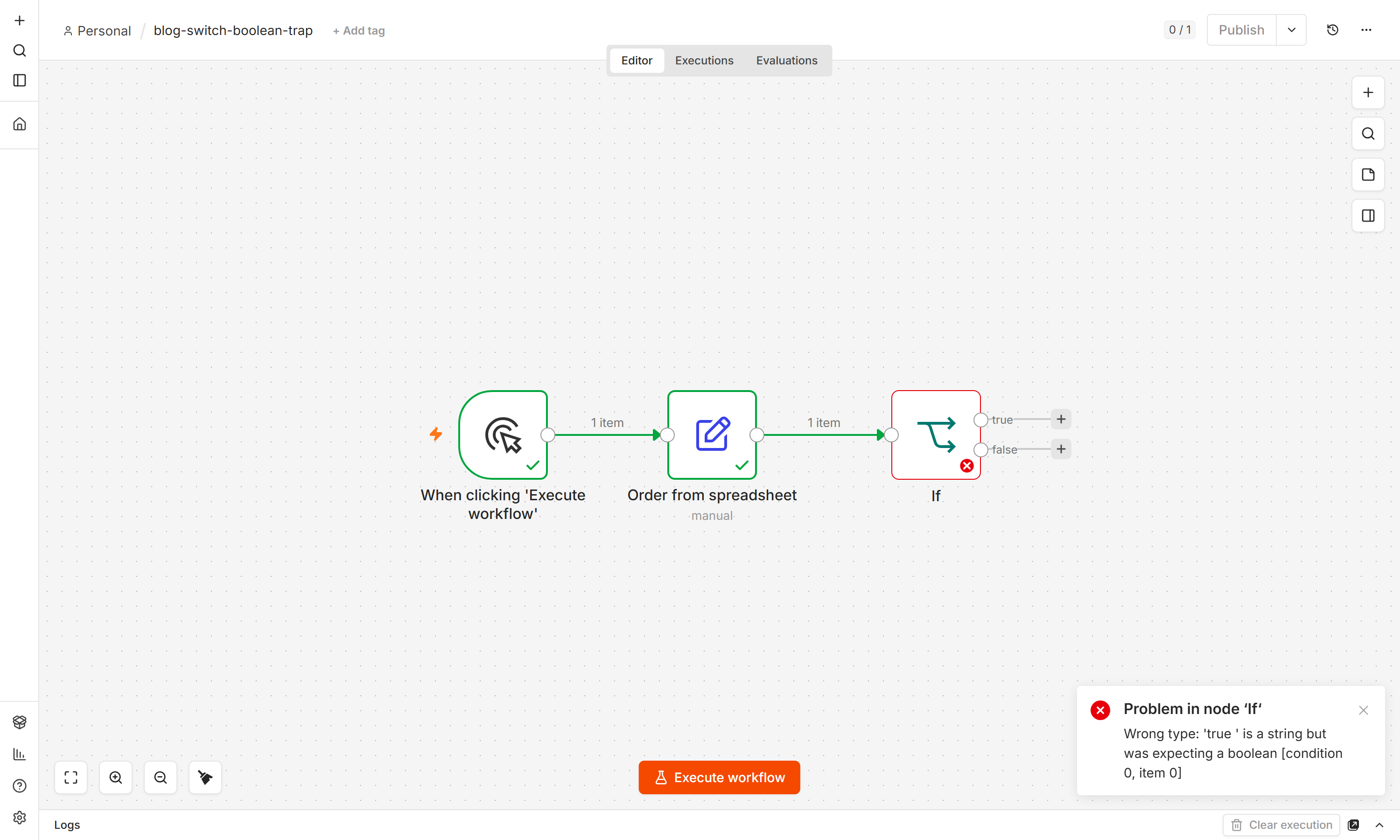
That trailing space is the whole story here. 'true ' with the space still inside the quotes is what n8n is telling you it received — not the clean boolean true, and not even the clean string "true". Something upstream built this value as text rather than passing the real boolean through, and strict mode refuses to guess at what you meant.
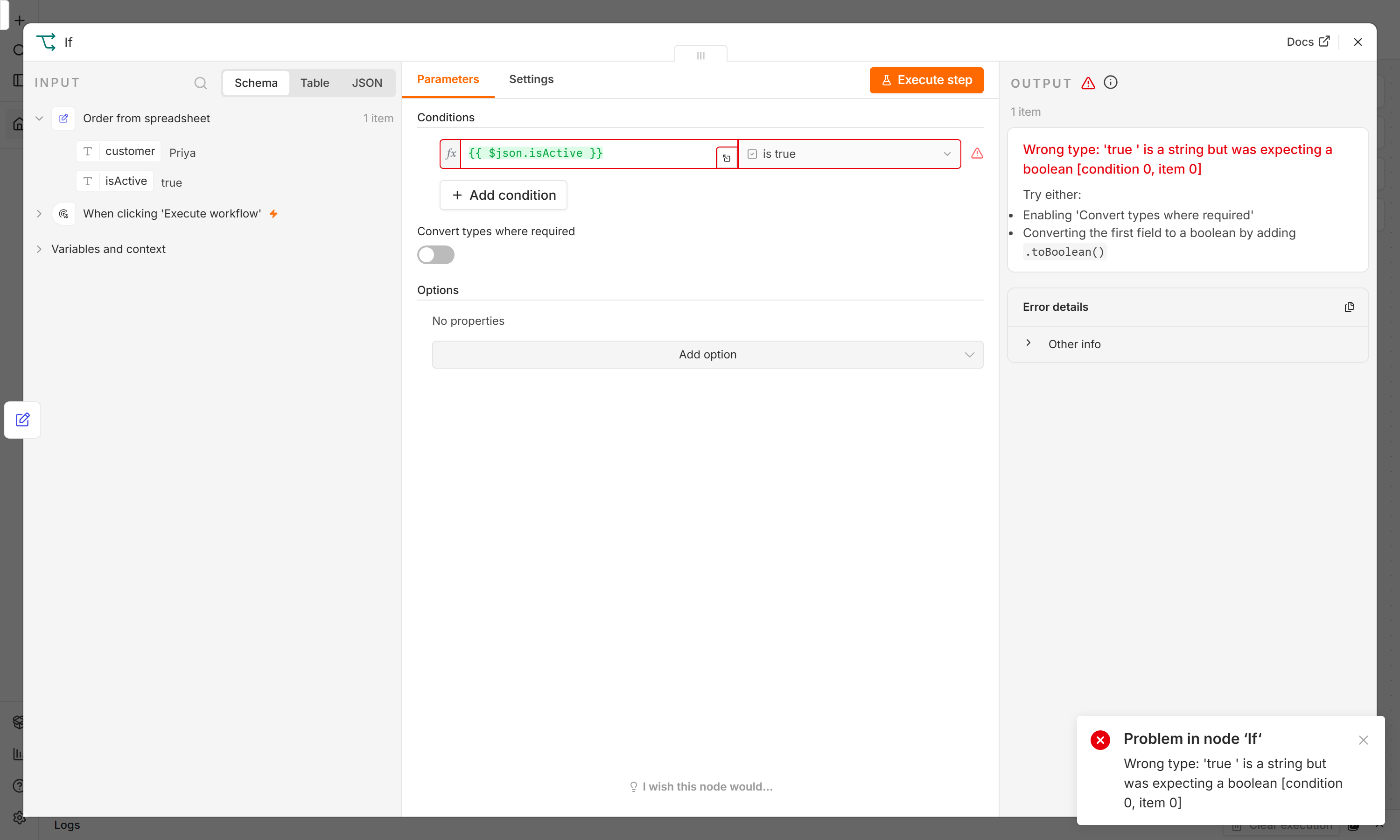
How to confirm you're looking at this: the error is loud enough that you won't miss it — the question is whether you recognise what it's telling you. It's not saying your condition is wrong. It's saying the value reaching the condition isn't the type the condition needs, and it wants you to fix that before it will compare anything at all.
The fix: trace the value back to wherever it stopped being a real boolean. If it's coming through an expression, check the expression itself for trailing characters — click into the field and walk to the very end of it with the arrow keys, past where the visible text appears to stop. If it's set by hand somewhere upstream in a Set/Edit Fields node, make sure that field's type is genuinely Boolean with the toggle switch as the input, not a text box someone typed the word true into.
What actually happens under loose type validation — and why that's not automatically safer
This is the mode most conditions run in by default, and it behaves completely differently on the exact same mismatched value. With type validation set to loose, the same string "true " doesn't throw anything. It gets coerced to the boolean true before the comparison runs, the condition passes, and the item goes down the true branch exactly as if the value had been a clean boolean all along. No error, no warning, nothing in the execution log to flag that a coercion even happened.
On the surface that sounds like the better outcome — the workflow just works, and you never have to think about it. Most of the time, it is the better outcome, because most of the time the value genuinely means what it says and coercion gets you to the right answer faster than a hard stop would have.
The part that breaks: loose mode is a guess, even when it's usually a good one, and a guess that's right ninety-nine times can still be wrong on the hundredth. The specific rules for exactly which strings coerce to which boolean, and what happens with something like an empty string or a value that isn't obviously true-or-false-shaped, aren't something to assume from memory — if a value you're not certain about is running through a loose condition, the safest way to know what it'll do is to run it and read the actual branch it lands on, rather than trusting that it'll behave the way "true " did. That's the trade loose mode makes: it trades a loud, specific failure for a quiet, usually-correct guess, and the cases where the guess goes the wrong way are exactly the ones that don't announce themselves.
Which mode should you actually be running
Neither is universally right, and that's the actual insight worth taking from this. Strict is the better choice while you're building and testing a workflow, because it turns a type mismatch into something you're forced to notice and fix immediately, at the moment it's cheapest to fix. Loose is the better choice once a workflow is stable and dealing with a data source you know is inconsistently typed — an external API, an older webhook — where you'd rather the workflow keep running on a value that's close enough than halt on every minor formatting difference.
A concrete habit worth adopting: build and test new boolean conditions with type validation strict, so any quoted-string or malformed value surfaces immediately as the specific error above, rather than as a wrong branch you have to notice on your own later. Once you've confirmed the upstream data is genuinely clean, loosening it for production resilience is a reasonable call — just one you're making on purpose, not one you inherited by never having looked at the setting.
Where to take it
If a condition throws "Wrong type," read it as information, not just an obstacle — it's telling you the real type of the value, which is often the fastest way to find where a boolean quietly became text upstream.
If a condition is running under loose validation and you're not sure what a borderline value will do, test it directly rather than assuming — run the workflow with that value and look at which branch it actually lands in, since the exact coercion behaviour for anything less obvious than a clean
"true"/"false"string isn't something worth guessing at.The trap is identical on the Switch node, since Switch and If share the same condition editor under the hood — everything above applies whether you're routing to two outputs or several.
See the IF node's other well-known gotcha — an unwired output silently dropping items — in the IF node tutorial.
If types are still a fuzzy idea, the complete beginner's guide covers what an item actually is and how JSON types move between nodes — which is the ground this whole problem stands on. It also points at the free 24-video course.
Get the next one
If you've ever had a condition behave in a way you couldn't explain, that's exactly the kind of gap between "what I assumed" and "what n8n actually does" I keep digging into. Subscribe and the next one lands with the gotcha already flagged.
For the full map of every n8n guide on the site, in order, the n8n hub has all of them.
FAQ
Why does my If node say "Wrong type: 'true ' is a string but was expecting a boolean"?
Your condition is set to compare against a Boolean type, and type validation on that condition is set to strict. Under strict validation, n8n refuses to compare a string against a boolean check and throws instead — it's telling you the value it received is text (in this exact case, the string "true " with a trailing space), not the real boolean data type your condition needs.
If I turn on loose type validation, will this error go away?
Yes, but the error going away isn't the same as the underlying mismatch being fixed — it means n8n will now attempt to coerce the value to the type your condition needs and compare the result, rather than stopping to tell you the types don't match. That's often exactly what you want for messy external data, but it also means a value that looks like "true" and a value that's genuinely wrong can both pass through silently, with no error either way.
Is loose type validation n8n's default?
Yes — a fresh condition in the If, Filter, or Switch node compares with loose (also labeled "Convert types where required" or "Less Strict Type Validation" depending on your version) type validation unless you've switched it to strict. That's why the silent-coercion behaviour is what most people experience by default, and the hard error is something you only see once you've turned strict validation on, deliberately or because it was already set that way in a workflow you copied.
What's the difference between this and the IF node's type-switch problem covered elsewhere?
They're different bugs living in the same part of the UI. The IF node tutorial covers what happens when you change a condition's type (say, String to Number) after already filling in values — the value fields silently clear. This is different: the condition's type was never changed, the value crossing into the node just isn't the type the condition expects, and what happens next — a loud error or a silent coercion — depends on the type validation setting, not on anything about how the condition itself was built.
Does this affect the Switch node the same way as the If node?
Yes — Switch and If use the same condition editor internally, so the same type validation setting, the same strict-throws / loose-coerces split, and the same error message format apply to both. Everything in this post transfers directly if you're seeing this on a Switch node's routing rules instead of an If node's condition.
Should I leave type validation strict or loose in a production workflow?
There's no single right answer — it depends on how much you trust the type of the data reaching that condition. Strict is safer while you're building, because a type mismatch stops the run immediately with a specific error instead of quietly doing something you didn't verify. Loose is more forgiving in production against a data source you know is inconsistently typed, at the cost of a wrong-but-plausible value being able to pass through without telling you.

