There's a moment in almost every "build an AI agent" tutorial where the creator casually says: "…and just paste your OpenAI API key here." And that's where the free ride ends. Now every time your agent thinks, it costs money. Test it fifty times while you're learning and you've burned through real cash before you've built anything useful.
New to n8n? Start with the complete beginner's guide — every concept explained once, with the whiteboard diagrams, then come back here.
Here's what those videos skip: you can run the AI itself on your own computer, for free, and plug it straight into n8n. No API key. No per-request billing. No sending your data to anyone. Your automations can think — using a model running privately on your own machine — and it costs exactly nothing to run it a thousand times.
I'll show you exactly how, and we'll finish with a working agent that pulls live data off the internet and reasons about it. It's genuinely one of the most satisfying things you can build, and it's free from start to finish.
What "AI agent" actually means (cut through the hype)
Strip away the buzzwords and an AI agent is just this: an automation that can think for itself at one or more steps. Instead of following rigid "if this exactly, then that," it hands a decision — a summary, a classification, a reply, a judgement — to a language model, and uses the answer to keep going.
In n8n terms, that means your workflow does something like: get some data → ask an AI what to make of it → act on the answer. The only special ingredient is a language model the workflow can talk to. Most tutorials rent that model from OpenAI. We're going to run our own.
Meet Ollama — your free, local AI engine
Ollama is a small, free tool that runs open language models directly on your computer. Think of it as your own private ChatGPT that lives on your machine: no account, no key, no internet required once a model is downloaded. It exposes a simple web address that other apps — like n8n — can send prompts to.
The models are smaller than GPT-4, but for the everyday jobs an agent does — summarizing, drafting, tagging, reacting — a small model is often more than enough, and it runs on an ordinary laptop with no graphics card.
Step 1: Run Ollama (one command)
Assuming you have Docker installed, start Ollama with:
docker run -d --name ollama -p 11434:11434 -v ollama:/root/.ollama ollama/ollama
Then pull a small, fast model — qwen2.5:0.5b is tiny (under 400 MB) and runs comfortably on a plain CPU:
docker exec ollama ollama pull qwen2.5:0.5b
That's your AI engine, running locally and listening on port 11434. You can test it in one line:
curl http://localhost:11434/api/generate -d '{"model":"qwen2.5:0.5b","prompt":"Say hello","stream":false}'
If it replies with a friendly greeting, your free AI brain is alive.
Step 2: Let n8n and Ollama talk to each other
This is the one step that trips people up, so let's get it right. If you're running both n8n and Ollama in Docker, they each live in their own little box — and "localhost" inside one box doesn't mean the other box. The clean fix is to put them on the same Docker network so they can find each other by name:
docker network create ai-net
docker network connect ai-net n8n
docker network connect ai-net ollama
Now, from inside n8n, Ollama's address is simply http://ollama:11434. (This is why a plain http://localhost:11434 fails from a containerized n8n — the network name is what works.)
Step 3: Build the agent in n8n
Here's the workflow we'll build — four nodes that fetch live data and have the AI react to it:
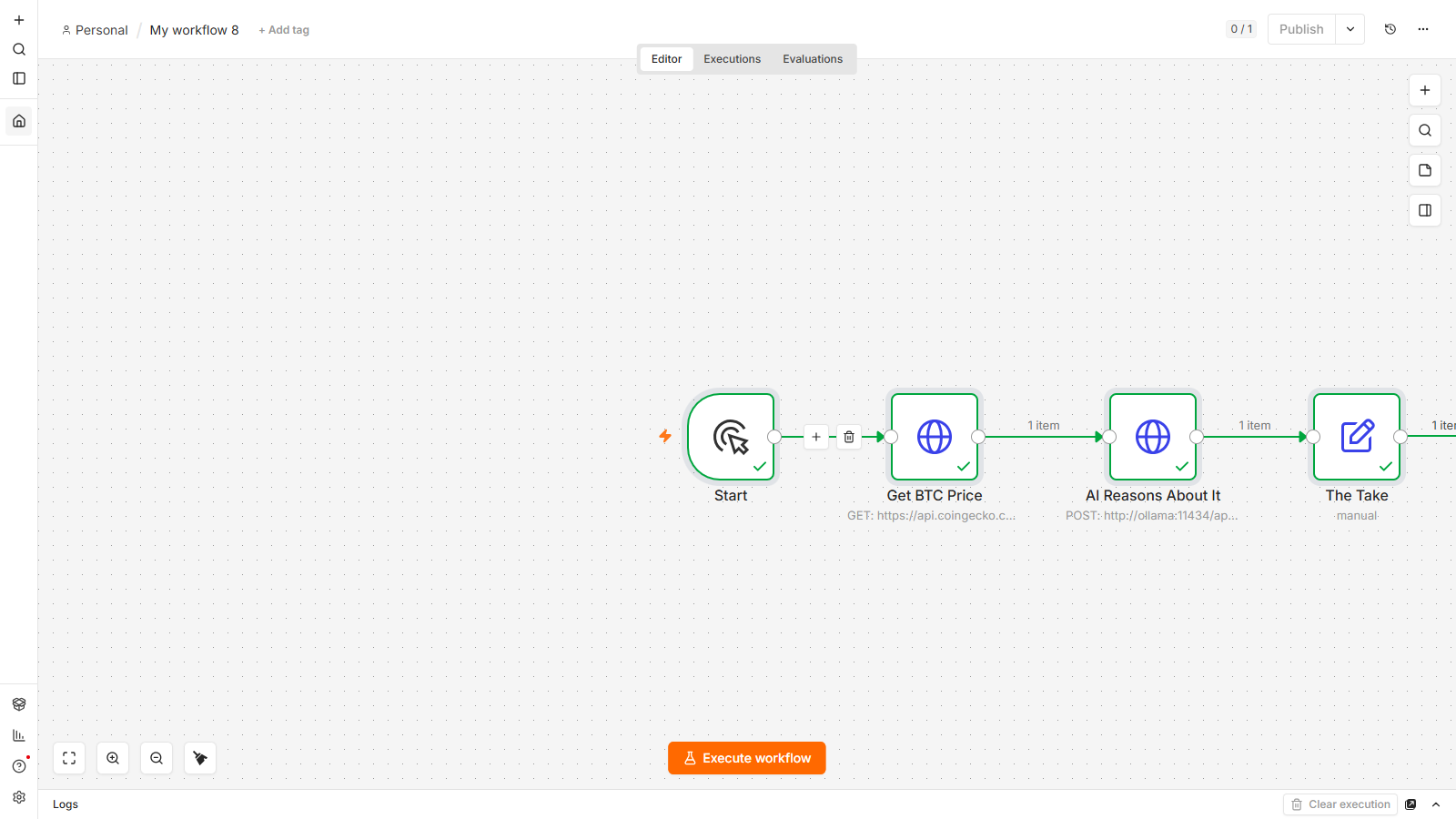
- Manual Trigger — our "Start" button.
- HTTP Request — Get BTC Price — calls a free crypto price API (
https://api.coingecko.com/api/v3/simple/price?ids=bitcoin&vs_currencies=usd). This is our live data. - HTTP Request — Ask the AI — a
POSTtohttp://ollama:11434/api/generate. The clever part is the request body, which we write as an expression so the live price flows into the prompt:
That{{ JSON.stringify({ model: "qwen2.5:0.5b", prompt: "Bitcoin is $" + $json.bitcoin.usd + " right now. Give a one-line witty take for investors.", stream: false }) }}$json.bitcoin.usdreaches back into the previous node and drops the real number into the AI's instructions. The model now reasons about today's actual price. - Edit Fields — The Take — pulls the AI's answer out of the response with
{{ $json.response }}so you get a clean result.
Wire them left to right: Start → Get BTC Price → Ask the AI → The Take.
The fast way to build it
You don't have to place each node by hand. In n8n you can paste a whole workflow as JSON onto the canvas — copy the JSON, click the canvas, press Ctrl+V, and every node and connection appears at once. It's how workflows get shared, and how you skip straight to the fun part.
Step 4: Run it and watch it think
Hit Execute workflow. Watch the chain light up green: the price node fetches a live number, the AI node takes a couple of seconds to think on your CPU, and The Take hands you a one-line comment the model wrote about the real, current price. You just built an agent that pulls fresh information off the internet and reasons about it — and there's no API key anywhere, no bill, and nothing left your machine.
That four-step shape — trigger → fetch → AI reasons → output — is the backbone of nearly every agent you'll ever build. Swap the data source and the prompt and you've got a different agent: summarize today's news, triage incoming emails, tag support tickets, draft replies. Same skeleton, endless uses, all free.
Where to take it next
- Feed it your own data — a Google Sheet, an RSS feed, a webhook payload — instead of a price API.
- Make it act — send the AI's output to Telegram, email, or a Sheet.
- Give it a bigger brain — pull a larger Ollama model (like
llama3.2) when your machine can handle it, for smarter answers. - Add memory or tools — n8n's dedicated AI Agent node lets you attach a local model the same way, plus conversation memory and tools, for more advanced agents.
FAQ
Can I really build an AI agent for free with no API key?
Yes. By running a local model with Ollama and calling it from n8n, the "thinking" happens on your own computer at no cost. There's no OpenAI or other API key involved and no per-request charge, so you can run and test your agent as many times as you like for free.
Is a local model good enough, or do I need GPT-4?
For the everyday jobs agents do — summarizing, drafting, classifying, reacting to data — a small local model like qwen2.5 is often plenty. For very complex reasoning you may want a larger model or a paid API, but you can build and ship a lot of genuinely useful automation on a free local model first.
Do I need a powerful computer or a GPU?
No. Small models such as qwen2.5:0.5b are designed to run on an ordinary CPU, so a normal laptop with no dedicated graphics card works fine. Larger models run faster with a GPU, but you don't need one to get started.
Why does http://localhost:11434 not work from n8n?
If n8n is running inside Docker, localhost refers to the n8n container itself, not your Ollama container. Put both containers on the same Docker network and address Ollama by its container name — http://ollama:11434 — and it connects reliably.
Is my data private with a local AI?
Yes — that's one of the biggest advantages. Because the model runs on your own machine via Ollama, the prompts and data you send it never leave your computer. Nothing is sent to a third-party AI provider.
Built and tested on a real free, self-hosted setup by lalittaparia.online — where I share the exact no-code AI automation systems I use, no expertise or budget required. Free AI agents are just the beginning.

