You keep seeing it. Every other video on your feed is someone building an "AI agent" or an "automation that runs my whole business" inside a tool called n8n — and it looks incredible. So you go to sign up… and land on a pricing page. Trial expires in 14 days. Suddenly the free automation dream has a monthly bill attached.
New to n8n? Start with the complete beginner's guide — every concept explained once, with the whiteboard diagrams, then come back here.
Here's the part nobody tells you clearly: n8n is open-source, and you can run the full thing on your own computer, for free, forever. No trial, no credit card, no expiry. Same editor, same nodes, same AI-agent features as the paid cloud. The only thing standing between you and your own private automation server is a single command.
I run it exactly this way, and in this guide I'll walk you through the whole thing — installing it, creating your account, and building a real workflow that fetches live data and runs end-to-end. By the end you'll have a working n8n instance that's yours, and you'll understand the pattern behind every automation you'll ever build in it.
Let's get you off the pricing page and into the actual product.
Wait — what is n8n, really?
Think of n8n (pronounced "n-eight-n," short for "nodenation") as a visual way to connect apps and let them do work while you sleep. You drag in a trigger ("when this happens…"), wire it to one or more actions ("…do these things"), and n8n runs the chain for you — on a schedule, on a webhook, or on demand.
Where it beats Zapier and Make: it's open-source, so you can self-host it and skip per-task pricing entirely, and it has proper AI Agent nodes built in, so you can drop a language model into any workflow. That combination — free to run, AI-native — is why it exploded in 2026.
The catch that trips beginners up is that most tutorials quietly use n8n Cloud (the paid, hosted version). We're going to use n8n self-hosted instead. Identical app, zero cost.
Why self-host instead of using the cloud?
Three reasons, and they all matter:
- It's genuinely free. Not a trial — the community edition is fully featured for personal use and never expires.
- Your data stays on your machine. Your API keys, your customer data, your workflows — none of it leaves your computer unless you want it to.
- No limits. No cap on the number of workflow executions, no "you've used your 1,000 tasks this month." Run it a million times.
The one trade-off: when your computer is off, your automations pause. For learning, building, and most personal projects, that's completely fine — and later you can move the exact same setup to a cheap always-on server.
Step 1: Install Docker (the only prerequisite)
Docker is the tool that lets you run n8n in a neat, self-contained box without installing a dozen other things. Grab Docker Desktop for your operating system from docker.com, install it, and launch it once so the engine is running. You'll know it's ready when the whale icon sits quietly in your system tray.
That's the entire setup. You don't need to know how Docker works — you just need it running in the background.
Step 2: Start n8n with one command
Open your terminal (PowerShell on Windows, Terminal on Mac) and paste this:
docker run -d --name n8n -p 5678:5678 -v n8n_data:/home/node/.n8n docker.n8n.io/n8nio/n8n
Here's what each part is doing, in plain English:
docker run -d— start it in the background.--name n8n— call this box "n8n" so it's easy to find later.-p 5678:5678— make it reachable in your browser at port 5678.-v n8n_data:/home/node/.n8n— this is the important one. It saves your workflows to a permanent volume, so nothing is lost when you restart.
The first time you run it, Docker downloads the n8n image (a minute or two). After that it starts in seconds. When it finishes, open your browser and go to:
http://localhost:5678
n8n is now running on your own machine. That's it — that's the "expensive cloud tool" everyone's making videos about, running for free on your laptop.
Step 3: Create your owner account
The first time you open it, n8n asks you to set up an owner account — email, name, and a password. This login is local to your machine; it's just what protects your instance. Fill it in, and you'll land on a friendly screen that says "What do you want to build?" with a Build a workflow button.
You're in. This is the exact same canvas the paid users see.
Step 4: Build your first real workflow
Let's build something that actually does something, so the concept clicks. We'll make a workflow that fetches the live price of Bitcoin and pulls out just the number. It's simple, but it teaches the pattern behind every n8n automation: trigger → get data → transform data.
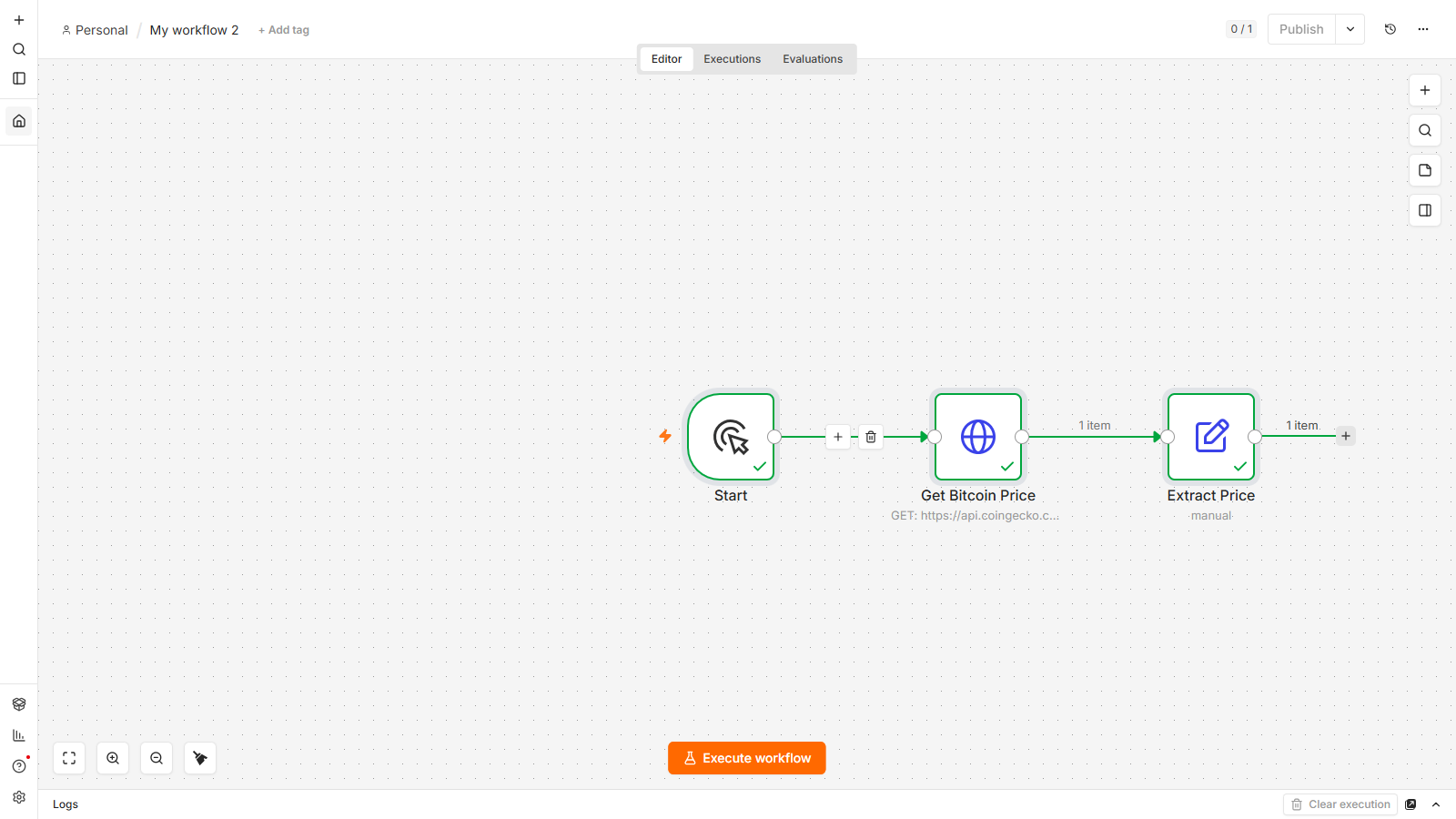
Click Build a workflow, then add three nodes:
- Manual Trigger — this is the "Start" node. It just lets you run the workflow on demand by clicking a button. (Later you'll swap this for a Schedule or Webhook trigger.)
- HTTP Request — the workhorse of n8n. It calls any web address and brings back the response. Set the URL to a free, no-key price API:
https://api.coingecko.com/api/v3/simple/price?ids=bitcoin&vs_currencies=usd - Edit Fields (Set) — this tidies the response down to just what you want. Add a field called
bitcoin_usdand set its value to the expression{{ $json.bitcoin.usd }}, which reaches into the data the previous node returned and grabs the price.
Connect them left to right — Start → HTTP Request → Edit Fields — by dragging from the little dot on the right of each node to the next.
The shortcut nobody mentions
Wiring nodes by hand is great for learning, but here's a pro move: you can paste an entire workflow as JSON straight onto the canvas. Copy a workflow's JSON, click anywhere on the canvas, and press Ctrl+V — n8n rebuilds every node and connection instantly. It's how you share workflows, and how you skip the tedious re-building when you already know what you want. (It's also how automated pipelines like ours build workflows at scale.)
Step 5: Run it and watch real data flow
Hit the Execute workflow button at the bottom. Watch each node light up with a green checkmark, one after another — Start ✓ → Get Bitcoin Price ✓ → Extract Price ✓ — with a little "1 item" badge showing data moving down the chain. Click the final node and you'll see today's Bitcoin price, live, pulled straight from the internet by a workflow you just built and you own.
That green run is the whole game. Once you can reliably do trigger → fetch → transform, you can build almost anything by swapping the pieces.
Where to go from here
You now have a free, self-hosted automation engine and you understand its core loop. The natural next steps — each a project on its own:
- Swap the trigger for a Schedule to run it automatically every morning.
- Add a Webhook trigger so other apps can kick off your workflows.
- Drop in an AI Agent node to build a chatbot or a research assistant (you can even run the model locally and free).
- Connect Google Sheets, Telegram, or WhatsApp to turn this into real business automation — lead capture, alerts, auto-replies.
Every one of those is just the same pattern with different nodes. You've already done the hard part: getting your own n8n running for free.
FAQ
Is n8n really free if I self-host it?
Yes. The n8n community edition is open-source and free to run on your own machine or server, with no execution limits and no expiry. You only pay if you choose n8n's hosted Cloud plan or need the enterprise features. For learning and personal or small-business automation, self-hosting costs nothing beyond the computer it runs on.
Do I need to know how to code to use n8n?
No. n8n is a visual, drag-and-connect tool — you build workflows by adding nodes and wiring them together. You can drop into small JavaScript expressions for advanced tricks (like {{ $json.bitcoin.usd }} to grab a value), but you can build a huge amount without writing any real code.
What's the difference between n8n Cloud and self-hosted n8n?
They're the same application. n8n Cloud is the paid, always-on hosted version — convenient, but priced per workflow execution. Self-hosted n8n runs on your own computer or server for free, with unlimited executions; the only downside is it's only "on" when your machine is. Workflows you build in one work in the other.
Does this work on Windows?
Yes. Docker Desktop runs on Windows, Mac, and Linux, and the same docker run command works on all of them. On Windows, just make sure Docker Desktop is open and running before you run the command.
How do I keep my n8n running or restart it?
Because we added -v n8n_data:/home/node/.n8n, your workflows are saved permanently. To stop n8n, run docker stop n8n; to start it again later, run docker start n8n — your workflows will all still be there. No rebuilding required.
Can I build AI agents on free self-hosted n8n?
Absolutely — the AI Agent nodes are included in the free edition. You can connect a paid model like GPT or Gemini with an API key, or run a local model (via Ollama) so your AI agent is free and private. That's one of the biggest reasons to self-host.
Built and tested on a real self-hosted n8n instance by lalittaparia.online — where I share the exact no-code AI automation systems I use, step by step. If this saved you a monthly bill, the channel is where the next builds live.